Tag: Student Work

  • Clink: Revolutionizing the Bar Experience for New Drinkers

    Research-Driven Design

    The development process spanned nine months and involved multiple stages of user research and prototype iteration. Key findings included:

    • 90% of inexperienced drinkers reported difficulty in deciding what to order
    • 75% of respondents expressed eagerness to learn more about cocktails

    These insights guided the team in creating a solution that addressed real user needs.

    Innovative Features

    Clink’s standout features include:

    • Personalized drink recommendations based on user preferences and interactions
    • A dark mode interface for easy viewing in dimly lit bars
    • AI-generated imagery for a cohesive visual experience
    • User-friendly search and filtering options

    The app’s design philosophy focused on minimal intrusion, aiming to enhance rather than disrupt the bar-going experience.

    Impact and Reception

    The Clink prototype made a significant impact at Westphal’s Digital Media Senior Showcase & Expo. Over 40 guests tested the live prototype, with many inquiring about its availability for download. The team’s newsletter garnered 47 sign-ups from individuals interested in following the app’s development and future launch.

    This project not only showcases the practical application of UXID principles but also demonstrates the potential for student-led innovations to address real-world challenges. The success of Clink at the showcase has inspired the team to consider further development, potentially turning this academic project into a marketable product.

    Clink stands as a testament to the quality of education and innovation fostered within Drexel’s UXID program, highlighting how user-centered design can create impactful solutions for everyday problems.
  • HexaGONE: A Chaotic Couch Brawler

    Party games thrive on chaos, quick reflexes, and nonstop fun, and HexaGONE delivers exactly that. Developed by Team HexaGONE, a group of junior-year GDAP students, this couch brawler pits players against each other in a fast-paced, physics-based battle where the goal is simple: be the last one standing.

    Game Overview: HexaGONE

    HexaGONE is a four-player local brawler that features dynamic, hexagon-based arenas filled with hazards and unique environmental mechanics. Inspired by classic party games like Super Smash Bros., Gang Beasts, and Boomerang Fu, the game focuses on quick rounds, unpredictable gameplay, and hilarious physics-based interactions.

    Key Features

    • Fast-paced, physics-based combat designed for local multiplayer
    • Dynamic arenas with destructible hexagonal tiles
    • Multiple level themes and hazards, including slippery ice and collapsing platforms
    • Designed for casual and competitive players alike, with a simple pick-up-and-play control scheme

    The Development Process

    Team HexaGONE built the game with an emphasis on engaging level design and unpredictable player interactions. Their early development phase involved prototyping different arena mechanics, testing movement physics, and designing unique hexagonal platform behaviors that force players to stay on their toes.

    Challenges and Solutions

    One of the biggest challenges for the team was balancing randomness and player control. To keep the game fun yet competitive, they refined movement mechanics and ensured that arena hazards remained fair but unpredictable. They also worked on making the game visually engaging, with distinct level themes and colorful, vibrant animations.

    Final Presentation and Future Development

    As part of the final showcase, Team HexaGONE presented their vision for the game, demonstrating chaotic multiplayer matches and highlighting future plans for additional maps and player customization. Their pitch was met with enthusiasm, showcasing the game’s potential as an exciting local multiplayer experience.

    Moving forward, the team hopes to expand HexaGONE with new maps, interactive hazards, and online multiplayer functionality. Their ability to craft a compelling and fun-filled party game demonstrates the strength of student-led innovation in game design.

  • Plumes and Pixels: Bridging Digital Innovation and Artistic Heritage

    The intersection of digital media, science, and artistic expression comes to life in Plumes and Pixels, an innovative project developed by graduate students in Drexel’s Digital Media Masters Program. This unique exhibition, inspired by a vintage headwear adorned with a bird of paradise, bridges history, technology, and artistic interpretation.

    Project Overview: Plumes and Pixels

    The Plumes and Pixels project began with the digitization of a rare artifact from the Academy of Natural Sciences—a Victorian-era hat decorated with real bird plumage. Using advanced computational photography and 3D Gaussian Splatting, students created a digital twin of the specimen, preserving intricate details while exploring the ethical and environmental implications of historical fashion practices.

    Bridging Digital and Traditional Art

    Rather than using traditional art as a starting point for digital works, students reversed the process—using digital reconstructions as inspiration for physical artwork. This experimental approach fostered creative exploration, allowing artists to blend historical research with modern digital techniques.

    Artistic Interpretations: Blending History and Innovation

    Each piece in the exhibition represents a personal response to the artifact, addressing themes of beauty, extinction, and humanity’s impact on nature. Students worked across various media, including digital prints, textile art, and sculptural works, to express their interpretations.

    Featured Artists and Works

    • Arefeh Ahmadi – “Arsenic-King of Poisons” explores the paradox of preservation, incorporating chemical structures into her art.
    • Rghad Balkhyoor – “Threads of Nature” uses nuno felting to weave narratives of loss and conservation.
    • Darren Woodland, Jr. – “Feathered Futurism” fuses historical aesthetics with digital techniques to reimagine avian symbolism in fashion.

    Educational Impact and Public Engagement

    Beyond the artistic achievements, Plumes and Pixels serves as a model for interdisciplinary learning. The project demonstrates how digital media techniques can be used to preserve cultural artifacts, engage with environmental history, and inspire new artistic methodologies.

    By integrating cutting-edge technology with artistic storytelling, the project highlights the potential of SciArt education—where scientific observation meets creative expression. Through public exhibitions and discussions, students were able to communicate their research and creative process to a wider audience, fostering dialogue about conservation, history, and the evolving role of digital preservation.

    Plumes and Pixels is a testament to the power of digital media to transform how we understand and engage with the past. This exhibition not only showcases student creativity but also emphasizes the importance of interdisciplinary collaboration in shaping the future of art, technology, and scientific inquiry.

  • WOMB: Exploring Black Wealth Through Digital Storytelling

    The intersection of digital media, storytelling, and cultural heritage is at the heart of WOMB: The Black Wealth Project. Developed as part of Drexel’s Digital Media Masters Program, this project delves into themes of generational wealth, legacy, and identity through immersive media and visual storytelling.

    Project Overview: WOMB – The Black Wealth Project

    WOMB is an exploration of the Black experience and wealth through the lens of history, culture, and personal narratives. Using digital media as a tool for advocacy and education, the project presents a multi-layered perspective on economic empowerment, systemic challenges, and the resilience of Black communities.

    Key Themes

    • Historical and cultural perspectives on Black wealth
    • Personal narratives exploring generational financial experiences
    • The impact of systemic barriers and economic disparities
    • Innovative approaches to visual storytelling using digital media

    The Creative Process

    The project was developed through an iterative process that combined archival research, personal interviews, and digital visualization techniques. By integrating photography, motion graphics, and narrative media, WOMB provides a deeply immersive experience that engages audiences on multiple levels.

    Challenges and Storytelling Strategies

    One of the biggest challenges in creating WOMB was finding a balance between historical context and personal stories. The project team employed a documentary-style approach, combining data visualization with deeply human narratives to create an emotionally resonant experience.

    Impact and Future Development

    The project was showcased as part of Drexel’s Digital Media Masters exhibition, drawing attention to the importance of storytelling in economic justice movements. Future iterations of WOMB may include interactive elements, expanded research, and broader community engagement to further the conversation around Black wealth and financial empowerment.

    Through its innovative use of digital media, WOMB invites audiences to reflect on the past, examine the present, and envision a future where economic equity is achievable. This project stands as a powerful example of how immersive media can be leveraged for social impact and storytelling.

  • Slime Rancher Zodiac

    IDM231: Scripting for Interactive Digital Media I

    By Amy Au – 2024

  • Arduynthisizer: A Digital Arduino Piano

    IDM382: Internet of Things by Wynn O’Donnell

    Overview

    For this project, I worked on developing an Arduino Piano with sound that can be modified and played through a browser. I called the original product in West107 the Arduorgan, a combination of the word Arduino, and the word Organ, a large piano-like musical instrument. If I go through with that theme this project will be called the Arduynthesizer, as it is an Arduino synthesizer. The Arduynthesizer will send signals to a browser when a button is pressed on it, and the browser will produce a sound based on the settings selected in the browser. The user will control the Arduynthesizer by pressing buttons on the Arduino, and by changing settings in a browser window with sliders. These sliders will include Pitch, volume, and tone.

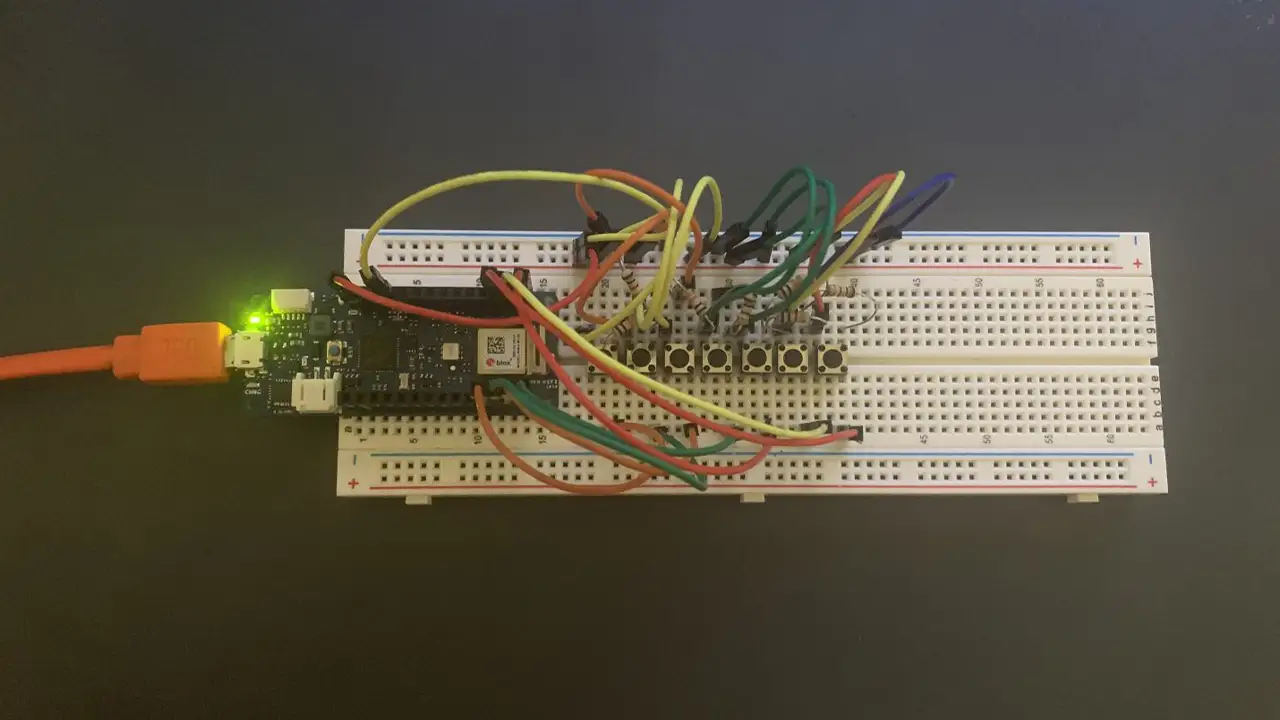
    Breadboard with Arduino, wires, and buttons, showing the layout of the project.

    Goals

    • Add more features to an Arduino piano I created in West107
    • Make it more like a synthesizer
    • Add variation to the sounds it can produce
    • Make the sound to be able to be controlled and heard from a browser window

    Final Presentation

    Sample Code

                /* 
                  #include "thingProperties.h"
    
                  const int buttonPin1 = 2;
                  const int buttonPin2 = 3;
                  const int buttonPin3 = 4;
                  const int buttonPin4 = 5;
                  const int buttonPin5 = 6;
                  const int buttonPin6 = 7;
                  const int buttonPin7 = 8;// the number of the pushbutton pin
                  const int ledPin =  13;      // the number of the LED pin
                  int buttonState1 = 0;
                  int buttonState2 = 0;
                  int buttonState3 = 0;
                  int buttonState4 = 0;
                  int buttonState5 = 0;
                  int buttonState6 = 0;
                  int buttonState7 = 0;
                  
                  String buttonpressStr1 = "Play C Note";
                  String buttonpressStr2 = "Play D Note";
                  String buttonpressStr3 = "Play E Note";
                  String buttonpressStr4 = "Play F Note";
                  String buttonpressStr5 = "Play G Note";
                  String buttonpressStr6 = "Play A Note";
                  String buttonpressStr7 = "Play B Note";
                  
                  void setup() {
                    // Defined in thingProperties.h
                    initProperties();
                      // Initialize serial and wait for port to open:
                    Serial.begin(9600);
                    // This delay gives the chance to wait for a Serial Monitor without 
                    blocking if none is found
                    delay(1500); 
                      // initialize the LED pin as an output:
                    pinMode(ledPin, OUTPUT);
                    // initialize the pushbutton pin as an input:
                    pinMode(buttonPin1, INPUT);
                    pinMode(buttonPin2, INPUT);
                    pinMode(buttonPin3, INPUT);
                    pinMode(buttonPin4, INPUT);
                    pinMode(buttonPin5, INPUT);
                    pinMode(buttonPin6, INPUT);
                    pinMode(buttonPin7, INPUT);
                  
                    // Connect to Arduino IoT Cloud
                    ArduinoCloud.begin(ArduinoIoTPreferredConnection);
                    
                    /*
                       The following function allows you to obtain more information
                       related to the state of network and IoT Cloud connection and errors,
                       the higher number the more granular information you’ll get.
                       The default is 0 (only errors).
                       Maximum is 4
                   */
                    setDebugMessageLevel(2);
                    ArduinoCloud.printDebugInfo();
                  }
                  
                  void loop() {
                    ArduinoCloud.update();
                    // Your code here 
                      buttonState1 = digitalRead(buttonPin1);
                      buttonState2 = digitalRead(buttonPin2);
                      buttonState3 = digitalRead(buttonPin3);
                      buttonState4 = digitalRead(buttonPin4);
                      buttonState5 = digitalRead(buttonPin5);
                      buttonState6 = digitalRead(buttonPin6);
                      buttonState7 = digitalRead(buttonPin7);
                  
                    // check if the pushbutton is pressed. If it is, the buttonState is HIGH:
                    if (buttonState1 == HIGH) {
                      // turn LED on:
                      digitalWrite(ledPin, HIGH);
                      Serial.println("Play C Note");
                      messenger = buttonpressStr1;
                    } else {
                      // turn LED off:
                      digitalWrite(ledPin, LOW);
                    }
                      if (buttonState2 == HIGH) {
                      // turn LED on:
                      digitalWrite(ledPin, HIGH);
                      Serial.println("Play D Note");
                      messenger = buttonpressStr2;
                    } else {
                      // turn LED off:
                      digitalWrite(ledPin, LOW);
                    }
                      if (buttonState3 == HIGH) {
                      // turn LED on:
                      digitalWrite(ledPin, HIGH);
                      Serial.println("Play E Note");
                      messenger = buttonpressStr3;
                    } else {
                      // turn LED off:
                      digitalWrite(ledPin, LOW);
                    }
                      if (buttonState4 == HIGH) {
                      // turn LED on:
                      digitalWrite(ledPin, HIGH);
                      Serial.println("Play F Note");
                      messenger = buttonpressStr4;
                    } else {
                      // turn LED off:
                      digitalWrite(ledPin, LOW);
                    }
                      if (buttonState5 == HIGH) {
                      // turn LED on:
                      digitalWrite(ledPin, HIGH);
                      Serial.println("Play G Note");
                      messenger = buttonpressStr5;
                    } else {
                      // turn LED off:
                      digitalWrite(ledPin, LOW);
                    }
                      if (buttonState6 == HIGH) {
                      // turn LED on:
                      digitalWrite(ledPin, HIGH);
                      Serial.println("Play A Note");
                      messenger = buttonpressStr6;
                    } else {
                      // turn LED off:
                      digitalWrite(ledPin, LOW);
                    }
                        if (buttonState7 == HIGH) {
                      // turn LED on:
                      digitalWrite(ledPin, HIGH);
                      Serial.println("Play B Note");
                      messenger = buttonpressStr7;
                    } else {
                      // turn LED off:
                      digitalWrite(ledPin, LOW);
                    }
                  }//End loop
                  
                  
                  void onMessengerChange() {
                    // Do something
                  }
      
  • Reading Realm LED NeoPixel: Using Technology to Promote Education

    IDM382: Internet of Things by Leanne Chin

    Overview

    Over the past 11 weeks, I worked on developing a device using the Internet of Things to be able to control a series of NeoPixel lights using a web browser in order to promote the use of technology to better the fundamental developmental growth of early childhood education. Through this project, I not only learned about the educational benefits that colors bring to a child’s education but also the process of understanding how to wire breadboards and work with Arduino without short-circuiting any equipment. I learned how to use a variety of different tools to reach my goal of working on my device online and how to adapt my code to each program.

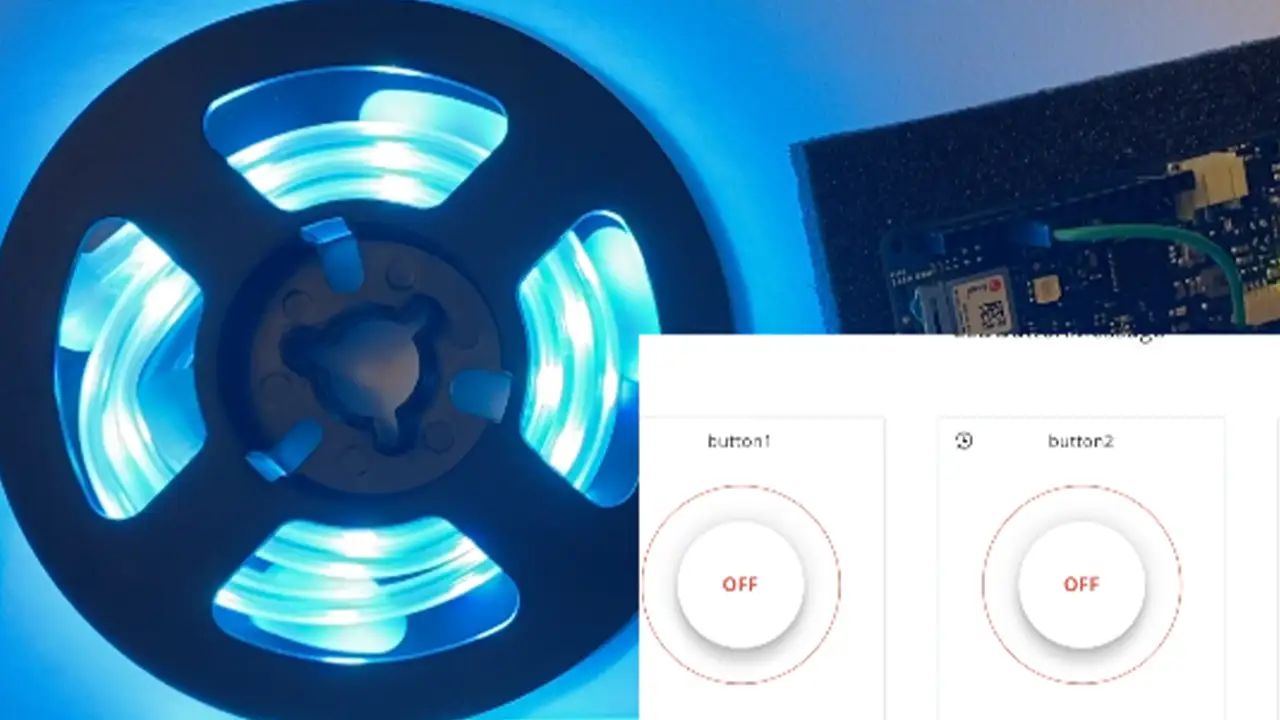
    LED lights with a recording of the controller interface in the bottom right corner to turn lights on and off.

    Goals

    • Allow online access from online dashboard to control LED lights
    • Debug problem with sticky buttons
    • Debug problem where clicking onto one button

    Final Presentation

    Future Plans

    • Seeing if it is possible to attach a projector to the Arduino
    • Developing an interactive story book projector that reacts to the buttons that are pressed using IoT

    Sample Code

     
    void loop() {
        ArduinoCloud.update();
        // Your code here 
        //Serial.println("looping");
        
        for(int i=0;i<NUMPIXELS;i++){
    
          // pixels.Color takes RGB values, from 0,0,0 up to 255,255,255
          pixels.setPixelColor(i, pixels.Color(redColor, greenColor, blueColor)); 
          // Moderately bright green color.
    
          pixels.show(); // This sends the updated pixel color to the hardware.
    
          delay(delayval); // Delay for a period of time (in milliseconds).
          
          // Serial.println(i);
          
        }
        
      } // END LOOP 
    
    
      void onLEDbuttonChange() {
        // Do something
      }
    
      void onButton1Change() {
        // Do something
        
        Serial.println("virtual button click");
        
        lEDbutton = "Button Color 1 Pushed";
          
          noColor();
        
      } // End Here
    
      void onButton2Change() {
        // Do something
        
        lEDbutton = "Button Color 2 Pushed";
        
        setColor();
        
      } // End Here
    
    
      void onButton3Change() {
        // Do something
        
        lEDbutton = "Button Color 3 Pushed";
        
        setColor2();
      }
    
      void noColor() {
        redColor = 0;
        greenColor = 0;
        blueColor = 0;
      };
    
    
      void setColor(){
        redColor = 0;
        greenColor = 255;
        blueColor = 255;
        Serial.print("red: ");
        Serial.print("green: ");
        Serial.print("blue: ");
        
      };
    
      void setColor2() {
        redColor = 255;
        greenColor = 0;
        blueColor = 255;
    };
      
  • Japanese Recipe Card

    IDM241: Microinteractions

    By Kara Butler – 2022

  • Video Game Browsing

    IDM241: Microinteractions

    By Durando Angiulo – 2022

  • DEI at Drexel University

    IDM241: Microinteractions

    By Samiha Shoshi – 2022